
When 10-year-old Amelia Mary Earhart saw her first plane at a state fair, she was not impressed. “It was a thing of rusty wire and wood and looked not at all interesting,” she dismissively said. It wasn’t until she attended a stunt-flying exhibition, almost a decade later, that she became seriously interested in aviation. A pilot spotted Earhart and her friend, who were watching from an isolated clearing, and dove at them. “I am sure he said to himself, ‘Watch me make them scamper,’” she exclaimed. Earhart, who felt a mixture of fear and pleasure, stood her ground. As the plane swooped by, something inside her awakened. “I did not understand it at the time,” she admitted, “but I believe that little red airplane said something to me as it swished by.” On December 28, 1920, pilot Frank Hawks gave her a ride that would forever change her life. “By the time I had got two or three hundred feet off the ground, I knew I had to fly.”
Although Earhart’s convictions were strong, challenging, prejudicial, and financial obstacles awaited her, but the former tomboy was no stranger to disapproval or doubt. Defying conventional feminine behavior, a young Earhart climbed trees, “belly slammed” her sled to start it downhill, and hunted rats with a .22 rifle. She also kept a scrapbook of newspaper clippings about successful women in predominantly male-oriented fields, including film direction and production, law, advertising, management, and mechanical engineering.
After graduating from Hyde Park High School in 1915, Earhart attended Ogontz, a girl’s finishing school in the suburbs of Philadelphia. She left in the middle of her second year to work as a nurse’s aide in a military hospital in Canada during WWI, attended college, and later became a social worker at Denison House, a settlement house in Boston. Earhart took her first flying lesson on January 3, 1921 and, in six months, managed to save enough money to buy her first plane. The second-hand Kinner Airster was a two-seater biplane painted bright yellow—Earhart named her newest obsession, “The Canary,” and used it to set her first women’s record by rising to an altitude of 14,000 feet.
One afternoon in April 1928, a phone call came for Earhart at work. “I’m too busy to answer just now,” she said. After hearing that it was important, Earhart relented, though she thought it was a prank. It wasn’t until the caller supplied excellent references that she realized the man was serious. “How would you like to be the first woman to fly the Atlantic?” he asked, to which Earhart promptly replied, “Yes!” After an interview in New York with the project coordinators, including book publisher and publicist George P. Putnam, she was asked to join pilot Wilmer “Bill” Stultz and co-pilot/mechanic Louis E. “Slim” Gordon. The team left Trepassey Harbor, Newfoundland, in a Fokker F7 named Friendship (on June 17, 1928), and arrived at Burry Port, Wales approximately 21 hours later. Their landmark flight made headlines worldwide because three pilots had died within the year trying to be that first women to fly across the Atlantic. When the crew returned to the United States, they were greeted with a ticker-tape parade in New York and a reception held by President Calvin Coolidge at the White House.
From then on, Earhart’s life revolved around flying—to start, she placed third at the Cleveland Women’s Air Derby, later nicknamed the “Powder Puff Derby” by Will Rogers. As fate would have it, George Putnam entered her life, too. The two developed a friendship during preparation for the Atlantic crossing and were married February 7th, 1931. Intent on retaining her independence, she referred to the marriage as a “partnership” with “dual control.”
Together, they worked on secret plans for Earhart to become the first woman and the second person to fly solo the Atlantic. On May 20th, 1932, five years to the day after Lindbergh, she took off from Harbor Grace, Newfoundland, to Paris. Strong north winds, icy conditions, and mechanical problems plagued the flight and forced her to land in a pasture near Londonderry, Ireland. “After scaring most of the cows in the neighborhood,” she said, “I pulled up in a farmer’s back yard.” As word of her flight spread, the media surrounded her, both overseas and in the United States. President Herbert Hoover presented Earhart with a gold medal from the National Geographic Society. Congress awarded her the Distinguished Flying Cross-the first ever given to a woman. At the ceremony, Vice President Charles Curtis praised her courage, saying she displayed “heroic courage and skill as a navigator at the risk of her life.” Earhart felt the flight proved that men and women were equal in “jobs requiring intelligence, coordination, speed, coolness, and willpower.”
In the years that followed, Earhart continued to reach new heights, setting an altitude record for autogyros of 18,415 feet that stood for years. On January 11, 1935, she became the first person to fly solo across the Pacific from Honolulu to Oakland, California. Chilled during the 2,408-mile flight, she unpacked a thermos of hot chocolate. “Indeed,” she murmured, “that was the most interesting cup of chocolate I have ever had, sitting up eight thousand feet over the middle of the Pacific Ocean quite alone.” Later that year, she was the first to solo from Mexico City to Newark. A large crowd “overflowed the field” and rushed Earhart’s plane. “I was rescued from my plane by husky policemen, one of whom, in the ensuing melee, took possession of my right arm and another of my left leg.” The officers headed for a police car, but chose different routes. “The arm-holder started to go one way, while he who clasped my leg set out in the opposite direction. The result provided the victim with a fleeting taste of the tortures of the rack. But, at that,” she said good-naturedly, “it was fine to be home again.”
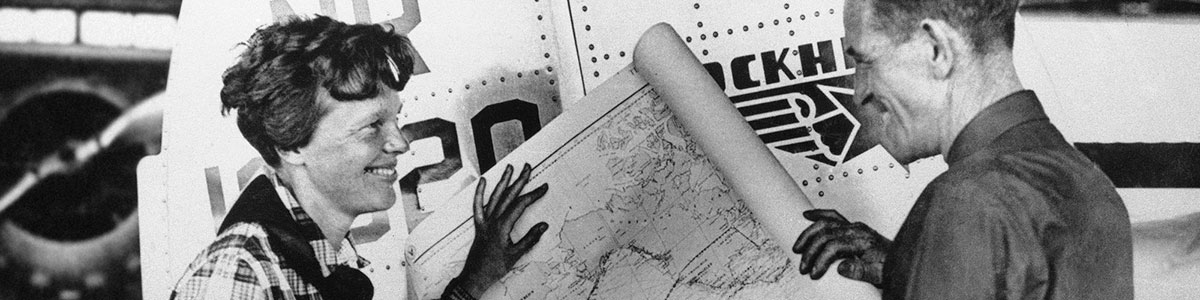
In 1937, as Earhart neared her 40th birthday, she was ready for a monumental, and final, challenge: she wanted to be the first woman to fly around the world. Despite a botched attempt in March that severely damaged her plane, a determined Earhart had the twin engine Lockheed Electra rebuilt. “I have a feeling that there is just about one more good flight left in my system, and I hope this trip is it,” she said. On June 1st, Earhart and her navigator, Fred Noonan, departed from Miami and began the 29,000-mile journey. By June 29th, when they landed in Lae, New Guinea, all but 7,000 miles had been completed. Frequently inaccurate maps had made navigation difficult for Noonan, and their next hop—to Howland Island—was by far the most challenging. Located 2,556 miles from Lae in the mid-Pacific, Howland Island is a mile and a half long and a half-mile wide. Every unessential item was removed from the plane to make room for additional fuel, which gave Earhart approximately 274 extra miles. The U.S. Coast Guard cutter ITASCA, their radio contact, was stationed just offshore of Howland Island. Two other U.S. ships, ordered to burn every light on board, were positioned along the flight route as markers. “Howland is such a small spot in the Pacific that every aid to locating it must be available,” Earhart emphasized.
On July 2nd, At 10 a.m. local time, zero Greenwich time, the pair took off. Despite ideal weather reports, they flew into overcast skies and intermittent rain showers. This made Noonan’s favored method of tracking, celestial navigation, difficult. As dawn neared, Earhart called the ITASCA, reporting “cloudy weather, cloudy.” In later transmissions, Earhart asked the ITASCA to take bearings on her. The ITASCA sent her a steady stream of transmissions, but she could not hear them. Her radio transmissions, irregular through most of the flight, were faint or interrupted with static. At 7:42 a.m., the Itasca picked up the message, “We must be on you, but we cannot see you. Fuel is running low. Been unable to reach you by radio. We are flying at 1,000 feet.” The ship tried to reply, but the plane seemed not to hear. At 8:45 a.m., Earhart reported, “We are running north and south.” Nothing further was heard from her.
A rescue attempt immediately commenced and became the most extensive air and sea search in naval history. On July 19th, after spending $4 million and scouring 250,000 square miles of ocean, the United States government reluctantly called off the operation. In 1938, a lighthouse was constructed on Howland Island in her memory, and across the United States, streets, schools, and airports are named after Earhart. Her birthplace, Atchison, Kansas, became a virtual shrine to her memory. Amelia Earhart awards and scholarships are given out every year.
Despite many theories, though, no proof of Earhart’s fate exists. There is no doubt, however, that the world will always remember Amelia Earhart for her courage, vision, and groundbreaking achievements, both in aviation and for women. In a letter to her husband, written in case a dangerous flight proved to be her last, her brave spirit was clear. “Please know I am quite aware of the hazards,” she said. “I want to do it because I want to do it. Women must try to do things as men have tried. When they fail, their failure must be but a challenge to others.”